A Phantom Blade Zero crash on launch is stopping at least one PC player from playing at all. They say the game crashes every time they try to start it, and they think Denuvo is to blame.
The report comes from launch day. S-GAME’s kungfupunk action RPG released on October 29 for PC and PS5 and had a huge start on Steam, peaking at 723,876 concurrent players. For some PC players, though, the game won’t even open.
That makes this kind of problem especially frustrating. A game can look like a huge success on the charts while a group of paying players can’t get past the launch screen. For anyone in that group, the record player count means very little until the game actually opens. It also shows why launch-day PC reports are worth watching closely, even for games that are selling extremely well.
Phantom Blade Zero crash on launch: what’s happening
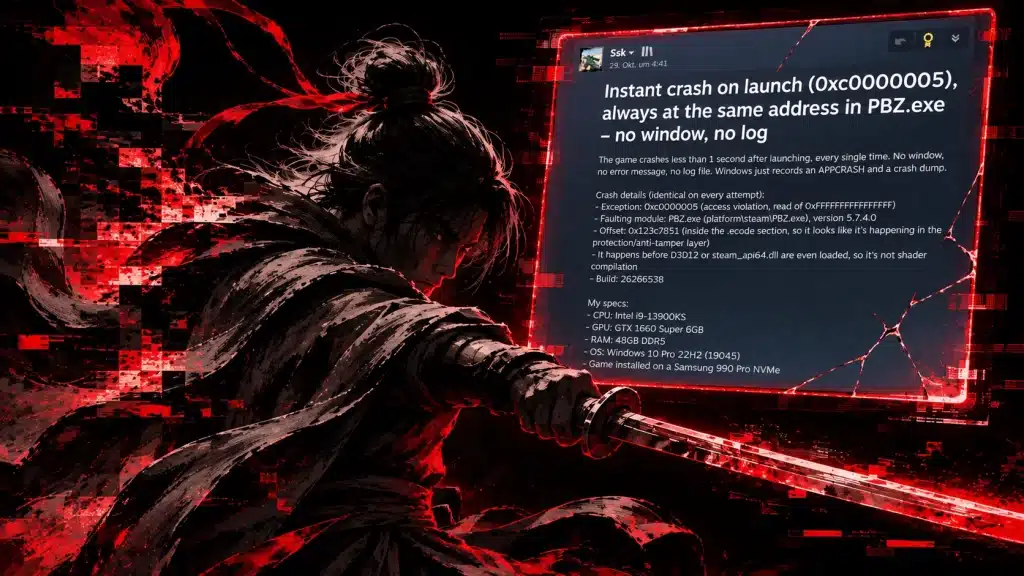
The crash happens in under a second, with error code 0xC0000005 and no error message on screen. No window appears and no log file is created. According to the player’s report, it happens before DirectX 12 or the Steam API even load, and always at the same address in PBZ.exe.
The player says the crash happens inside the part of the executable linked to the game’s protection layer. That suggests the problem is not shaders, drivers or graphics settings, but something inside the game’s executable itself, where Denuvo’s anti-tamper protection runs.
The same crash happens on every attempt, with identical details each time. That consistency matters, because it points to a specific conflict rather than a random hardware fault or an unstable overclock.
Why Denuvo is the main suspect
Error 0xC0000005 is a general Windows access violation, so it can have several causes. The timing is what makes Denuvo the main suspect. The crash happens so early that the game hasn’t started rendering yet, and the anti-tamper layer is one of the first things to run.
Phantom Blade Zero’s use of Denuvo on PC was confirmed before launch, and the DRM has long been controversial. Critics argue it mostly hurts paying customers with performance problems and crashes like this, while pirates wait for cracks.
Denuvo has been linked to launch problems in other games before, which is why players were quick to point the finger here. Neither S-GAME nor Denuvo has commented on this specific report yet, so for now it remains a player’s diagnosis rather than a confirmed cause.
How to fix the Phantom Blade Zero crash
There is no official fix yet, but these steps are worth trying first:
- Verify game files in Steam
- Update your GPU drivers and Windows
- Temporarily disable overlays and antivirus real-time scanning
- Run the game as administrator
- Restart your PC after any driver or Windows update before launching again
If none of that works, report the Phantom Blade Zero crash on the Phantom Blade Zero Steam discussions with your crash details so the developers can track the issue. Include your error code, build number and PC specs, since that helps the team spot patterns.
Keep an eye on the game’s patch notes as well. Launch-day crash fixes often arrive in the first few updates, and a fix for a problem this specific would most likely come from the developer working with Denuvo.
Is the crash hurting the player count?
It’s not yet clear how many players are affected, and Phantom Blade Zero’s overall numbers have stayed strong since launch. You can follow how the game is holding up on our Phantom Blade Zero Steam charts, and compare it with other big games on our most played Steam games list.